

Task 0 - Instructions
Welcome to Warehouse Setup Task of Cosmo Logistic theme of eYRC 2023-24!
Note: Deadline for the submission of this task is 18th September, 2023
This task aims to get your team started with installing the required software components and familiarizing with ROS. Students need to install the mentioned software & libraries by running the provided instructions in the given sequence.
Note:
In case of an error, please do not panic.
Debugging errors will help understand that particular concept much more in detail.
We insist on solving that error first and then proceeding further.
1. Problem Statement
The objective of the task is to setup the warehouse world simulation for cosmo logistic theme in your system. And to verify the world is properly configured with required packages.
2. Procedure
Build packages
First, create a workspace, refer link to know how to do so. Once done, compile and source the packages.
Cloning the Cosmo Logistic (CL) repository
-
Navigate inside your
colcon_wsdirectory and clone the cosmo logistic theme repo (Make sure the src folder is empty)-cd ~/colcon_ws git clone https://github.com/eYantra-Robotics-Competition/eYRC-2023_Cosmo_Logistic ./src/ git checkout tags/v1.0.1 .NOTE: After task 0 to get back to rest of the tasks, use
git checkout main. For users who do not havegitinstalled. Enter the following command for installation-
sudo apt install gitCosmo Logistic package might take some time to clone, depending on your internet speed.
-
Install additional packages before you build the workspace and gazebo changes by using the following commands-
cd ~/colcon_ws/src/ # assuming your workspace is named as colcon_ws . requirements.sh -
To source the installed gazebo file
echo "source /usr/share/gazebo-11/setup.bash" >> ~/.bashrc source ~/.bashrc # source bashrc as we have made changes -
Navigate to
colcon_wsdirectory and build the colcon workspace usingcolcon buildcommand.NOTE: To build the package in the system, ensure that the terminal is pointing at
~/colcon_wsdirectory and not in~/colcon_ws/src.cd ~/colcon_ws colcon buildThe setup is now complete!
-
After the package has been successfully built, do not forget to source it
source install/setup.bashFor every new package cloned or created within the
srcof your colcon workspace, you should build & source the workspace to proceed.And to avoid sourcing setup file everytime add this to your
bashrcusing following command:echo "source ~/colcon_ws/install/setup.bash" >> ~/.bashrc source ~/.bashrc # source bashrc as we have made changes -
To run the task 0 launch file, enter:
ros2 launch ebot_description ebot_gazebo_launch.pyThis should open gazebo application having mobile robot (named as ebot) spawned inside a warehouse like this.
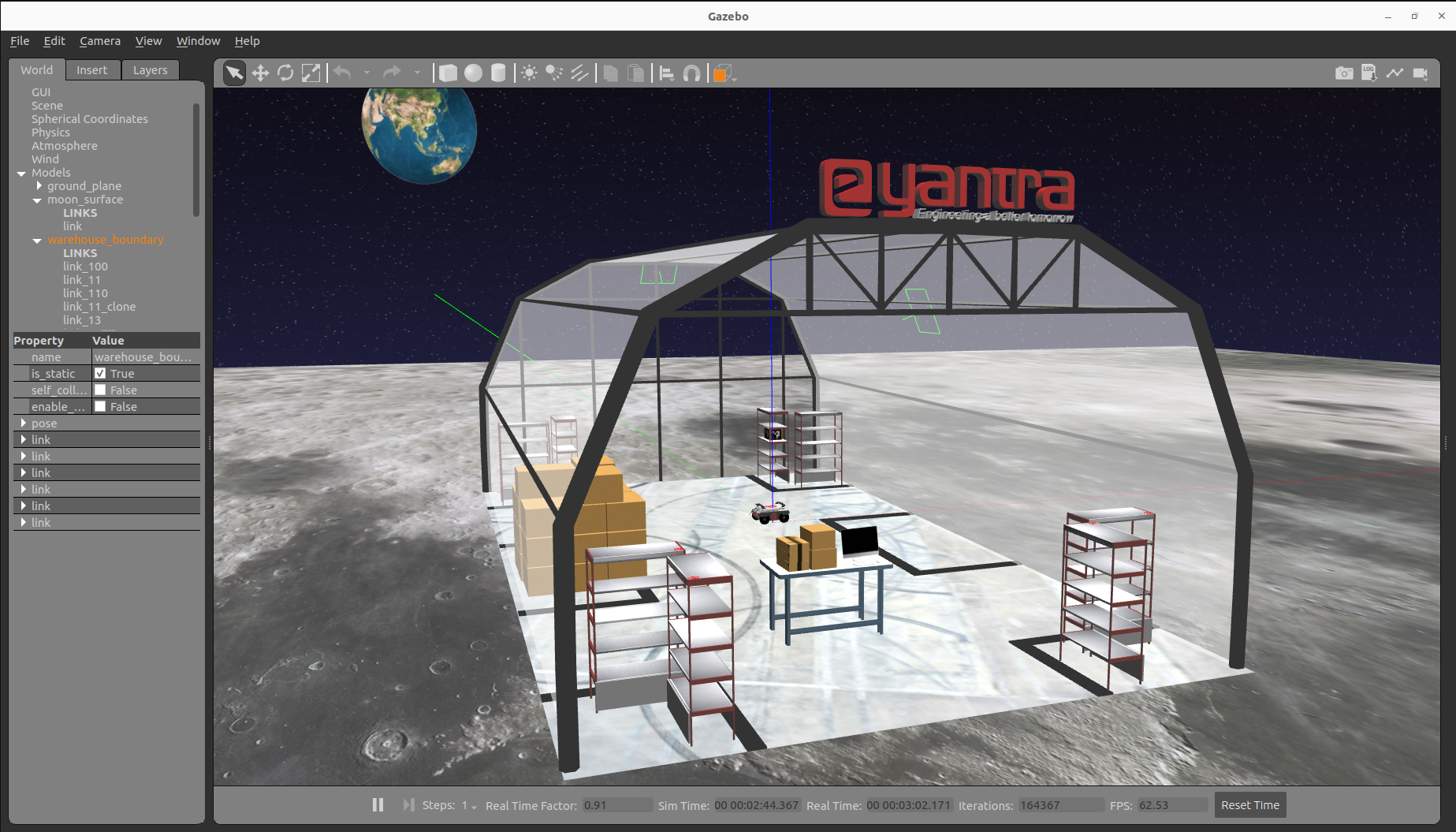
-
This repository contains three packages (as of now):
- aws-robomaker-small-warehouse-world: Contains warehouse rack and package models
- ebot_description: Contains mobile robot (ebot) description model
- eyantra_warehouse: Contains warehouse world model
3. Tips and Information
Things running when you launch the robot gazebo
- Gazebo simulator is launched with a warehouse world
- Ebot (mobile robot) is spawned into this warehouse world in gazebo
- Joint states (i.e., wheel joints) are published with help of differential-drive plugin (You can refer this to know more on Gazebo ros plugins)
- TF (transformations) are being published based on robot model.
Troubleshooting some common mistakes/errors
-
If you find gzclient process has died with this type of error message. This means you need to first source your gazebo setup file
[gzclient-2] gzclient: /usr/include/boost/smart_ptr/shared_ptr.hpp:728: typename boost::detail::sp_member_access<T>::type boost::shared_ptr<T>::operator->() const [with T = gazebo::rendering::Camera; typename boost::detail::sp_member_access<T>::type = gazebo::rendering::Camera*]: Assertion `px != 0' failed.
[ERROR] [gzclient-2]: process has died [pid 111782, exit code -6, cmd 'gzclient'].
To solve this, source the setup file in the terminal:
source /usr/share/gazebo-11/setup.bash -
If you find gazebo is not launching and robot is not spawning and is waiting more than 30 seceonds, it is probably possible that your Gazebo (gzserver) has got stuck. For this you can kill the gzserver and relaunch everything again.
killall gzserver
(Optional) Try exploring on your own
- Open RViz using
ros2 run rviz2 rviz2and load robot model to visualize ebot in RViz by setting fixed frame toebot_base_link. - Further you may discover some interesting topics such as
tfto visualize different link frames and the parental behaviour in rviz - Once can use a builtin package
teleopto navigate/control robot and move it in gazebo environment using keyboard keys. For this you need to runros2 run teleop_twist_keyboard teleop_twist_keyboard(If not installed, use thissudo apt-get install ros-humble-teleop-twist-keyboard) - Alternative to ubuntu terminals:
Terminatoris a pretty badass emulator which provides you with functionalities like split horizontally, split vertically, etc, as one wants in a single window. To install it use the following command:sudo apt install terminator