

Task 1C - Submission
Submission instructions for task 1C:
- NOTE: All your tasks will be checked using a plagiarism software. If any submitted file is found to be plagiarised, e-Yantra reserves the right to disqualify the team.
-
Upgrade your
eyantra-autoevalpackage by running the command given belowpip3 install -U eyantra-autoeval -
First launch the robot in gazebo as instructed before
ros2 launch ebot_description ebot_gazebo_launch.py -
Now launch the bringup launch for Nav2 stack
ros2 launch ebot_nav2 ebot_bringup_launch.pykeep it running. -
Then open a new terminal and execute the auto eval script
eyantra-autoeval evaluate --year 2023 --theme CL --task 1C. -
Wait for
DATA COLLECTION STARTED FOR TASK 1CINFO to be shown on the terminal. -
Now, run your Python script to navigate the bot, and once the task is completed go to the autoeval terminal and use
Ctrl + ckey once which will generate amy_bag/my_bag_0.db3bag file in the same directory (inside a folder namedmy_bag).
NOTE: You can verify the bag file duration by using the command
ros2 bag info my_bag_0.db3by navigating to the directory containing.db3bag file. This is not the run time of your task but the bag file recording time.
-
Now add your python script and rename it as
nav2_cmd_task1c.pyto the same directory and also add yourmap.pgm(It will be something you named while saving) -
Create a
.zipfile by selecting all three files i.e. Python, yaml, pgm and bag file. Take a look at the below.GIFto understand it better. (Note: Do not compress the whole folder)
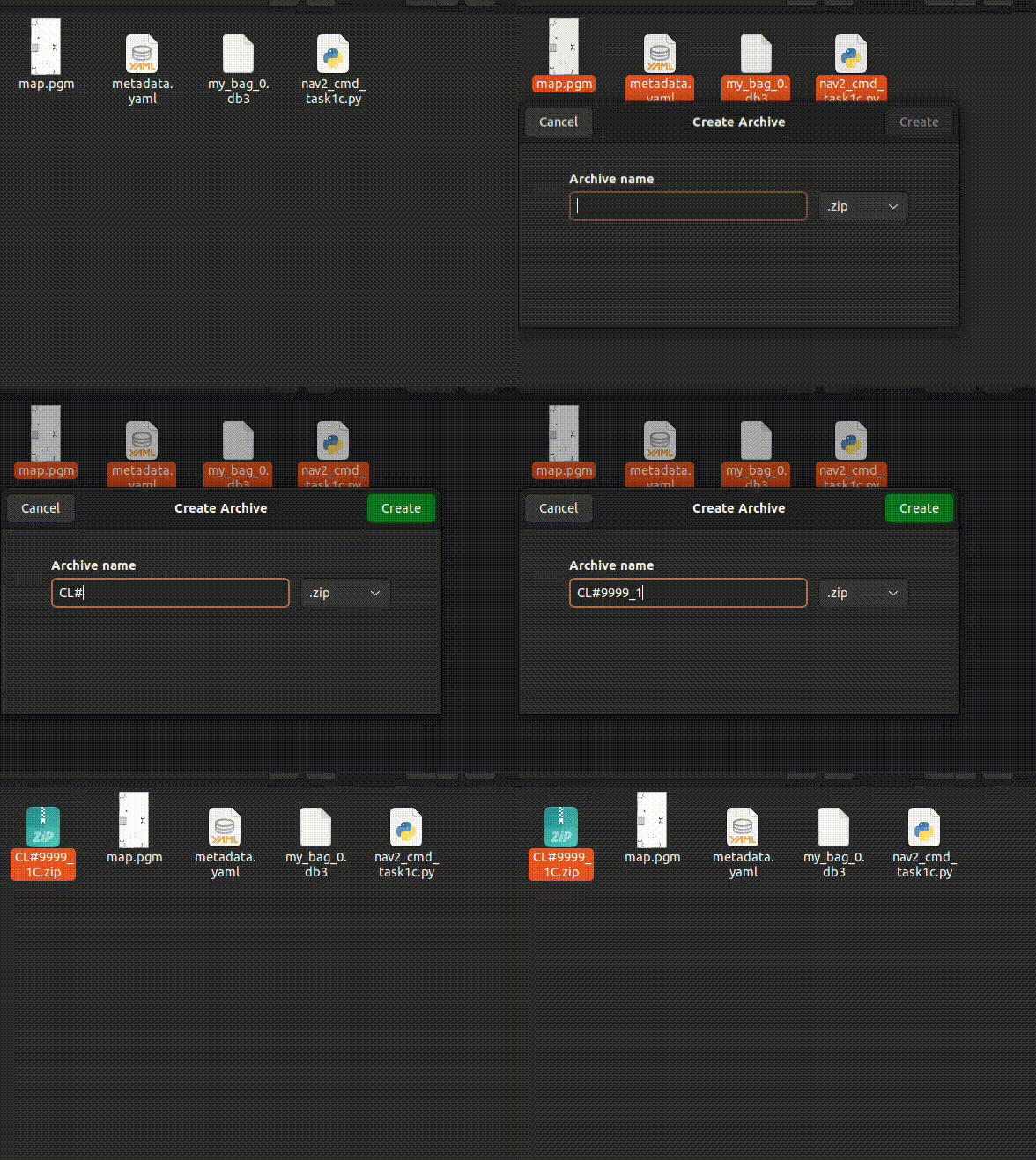
- Once the zip is created, rename it as
<CL#team_id_1C>(For example, if your team id is 1679, rename file asCL#1679_1C.zip) and submit on eYRC Portal - Task 1 by selecting option 1C.
Grading
This task will be graded out of 30
Maximum Marks-Marks: 30.00
Failed Task-Marks: 0.00
Formula
Task_1C_Marks = ([CNP1 + CNP2 + CNP3] * 7) + (MPS * 9)
CNP: Correct Navigation Pose -
- The navigation pose correspondes to the three given poses which is marked on the map in
Instrctions Section - The value for CNP1, CNP2 and CNP3 will be in binary format and corresponds to respective mark on the warehouse arena.
- Allowed deviation from actual given pose: +-0.3 meter (pose error) and +-10 degrees(orientation error)
- For example: if the bot reached P1 and P2 within error, and failed to reach P3 (either distance or orientation), the score will be CNP1=1, CNP2=1 and CNP3=0
MPS: Map Score -
- Maximum map score: 9
- It will be scored based on how well the map is constructed using SLAM
- The map should be closed, continues and non-distored.
- It will be scored using matching algorithms