

Mapping - Saving the map
1. Try to build the map without any empty cell in the arena or in the middle.
- Finally, congrats you have made you first map. Let's save it.
2. Go to RViz, here you see Panals in that you will get Add New Panals
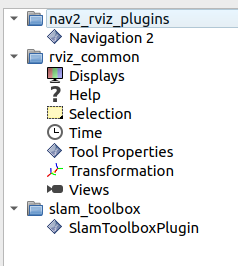
- Select
SlamToolboxPluginunderslam_toolbox
3. Just enter map or your map name in both first 2 rows and click on both Save Map and Seriallize Map
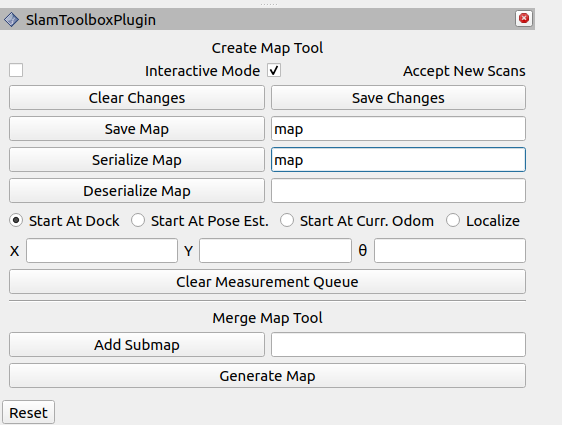
- This will save the map in your opened directry i.e.
/colcon_ws/
4. Here you will find 4 files named map.data, map.pgm, map.posegraph and map.yaml
- Just copy that in the pkg
ebot_nav2i.e./ebot_nav2/maps/
5. Update the map name in ebot_bringup_launch.py launch file in dir /ebot_nav2/launch/.
	declare_map_yaml_cmd = DeclareLaunchArgument(
        'map',
        default_value=os.path.join(ebot_nav2_dir, 'maps', 'map_name.yaml'),  ## Update the map config here
        description='Full path to map yaml file to load')
6. Update the map name in nav2_params.yaml launch file in dir /ebot_nav2/params/.
	map_server:
    ros__parameters:
    use_sim_time: True
    yaml_filename: "map_name.yaml"  ## Update the map name here
7. Since we added map files in the ebot_nav2 pkg, we have to rebuild it.
colcon build
OR
colcon build --symlink-install
Why to rebuild ?? Google it !