

IMPORTANT: Since we are done building the map, Just comment or remove it from
ebot_bringup_launch.py:ld.add_action(declare_mapper_online_async_param_cmd) ld.add_action(mapper_online_async_param_launch)It uses SLAM
1. Setting up EKF:
Check robot_localization installation, To Know more
ros2 pkg list | grep robot_localization
- You should get
robot_localizationas output, which means we are good to go. - If not, install
robot_localizationusing,
sudo apt install ros-humble-robot-localization
Update EKF parameters in robot_localization dir at /ebot_nav2/config/ekf.yaml,
    map_frame: map                   # map frame define
    odom_frame: odom                 # odom frame define
    base_link_frame: ebot_base_link  # our ebot_base_link is the base frame
    world_frame: odom                # Defaults to the value of odom_frame if unspecified


    odom0: /odom_topic                     # odom topic here
    odom0_config: [true, true, true,      # To know more about it read ekf.yaml
                    false, false, false,
                    true,  true,  true,
                    false, false, true,
                    false, false, false]

    imu0: /imu_topic                       # imu topic here
        imu0_config: [false, false, false,   # To know more about it read ekf.yaml
                      true,  true,  true,
                      false, false, false,
                      false,  false,  false,
                      false,  false,  false]
Adding the robot_localization node in the ebot_bringup_launch.py launch file in dir /ebot_nav2/launch/, it's already added in launch file.
     robot_localization_node = Node(
       package='robot_localization',
       executable='ekf_node',
       name='ekf_filter_node',
       output='screen',
       parameters=[os.path.join(ebot_nav2_dir, 'config/ekf.yaml'), {'use_sim_time': use_sim_time}] ##Loads the ekf.yaml file
        )
Just add this as the object of LaunchDescription() in the same launch file, in the last
ld.add_action(robot_localization_node)
- Just save it
2. Setting up AMCL:
Nav2 in built has amcl, just need to update the ros_params in nav2_params.yaml in dir /ebot_nav2/params/
amcl:
  ros__parameters:
    use_sim_time: True
    alpha1: 0.00005   ## alpha's are related to odom model tuning, refer Nav2 Docs
    alpha2: 0.00005
    alpha3: 0.00005
    alpha4: 0.00005
    alpha5: 0.00005
    base_frame_id: "base_footprint" #
    beam_skip_distance: 0.5
    beam_skip_error_threshold: 0.9
    beam_skip_threshold: 0.3
    do_beamskip: false
    global_frame_id: "map"
    lambda_short: 0.1
    laser_likelihood_max_dist: 2.0
    laser_max_range: 100.0
    laser_min_range: -1.0
    laser_model_type: "likelihood_field"
    max_beams: 60
    max_particles: 5000
    min_particles: 300
    odom_frame_id: "odom"
    pf_err: 0.01
    pf_z: 0.99
    recovery_alpha_fast: 0.0
    recovery_alpha_slow: 0.0
    resample_interval: 1
    robot_model_type: "nav2_amcl::DifferentialMotionModel"
    save_pose_rate: 0.5
    sigma_hit: 0.2
    tf_broadcast: true
    transform_tolerance: 0.5
    update_min_a: 0.2
    update_min_d: 0.25
    z_hit: 0.5
    z_max: 0.05
    z_rand: 0.5
    z_short: 0.05
    scan_topic: scan
    map_topic: map
    set_initial_pose: True
    always_reset_initial_pose: False
    first_map_only: False
    initial_pose:
      x: 0.0
      y: 0.0
      z: 0.0
      yaw: 0.0

amcl_map_client:
  ros__parameters:
    use_sim_time: True

amcl_rclcpp_node:
  ros__parameters:
    use_sim_time: True
Just add this as the object of LaunchDescription() in ebot_bringup_launch.py launch file in dir /ebot_nav2/launch/. Add it in the last
ld.add_action(bringup_cmd_group)
-
Just save it
-
To know more refer here
3. Check Localization:
Almost everything is set, now just check your localization
- Start Gazebo enviroment:
ros2 launch ebot_description ebot_gazebo_launch.py
- Start Nav2 Bringup:
ros2 launch ebot_nav2 ebot_bringup_launch.py
- Start teleop_twist_keyboard:
ros2 run teleop_twist_keyboard teleop_twist_keyboard
- Rviz will look like this,
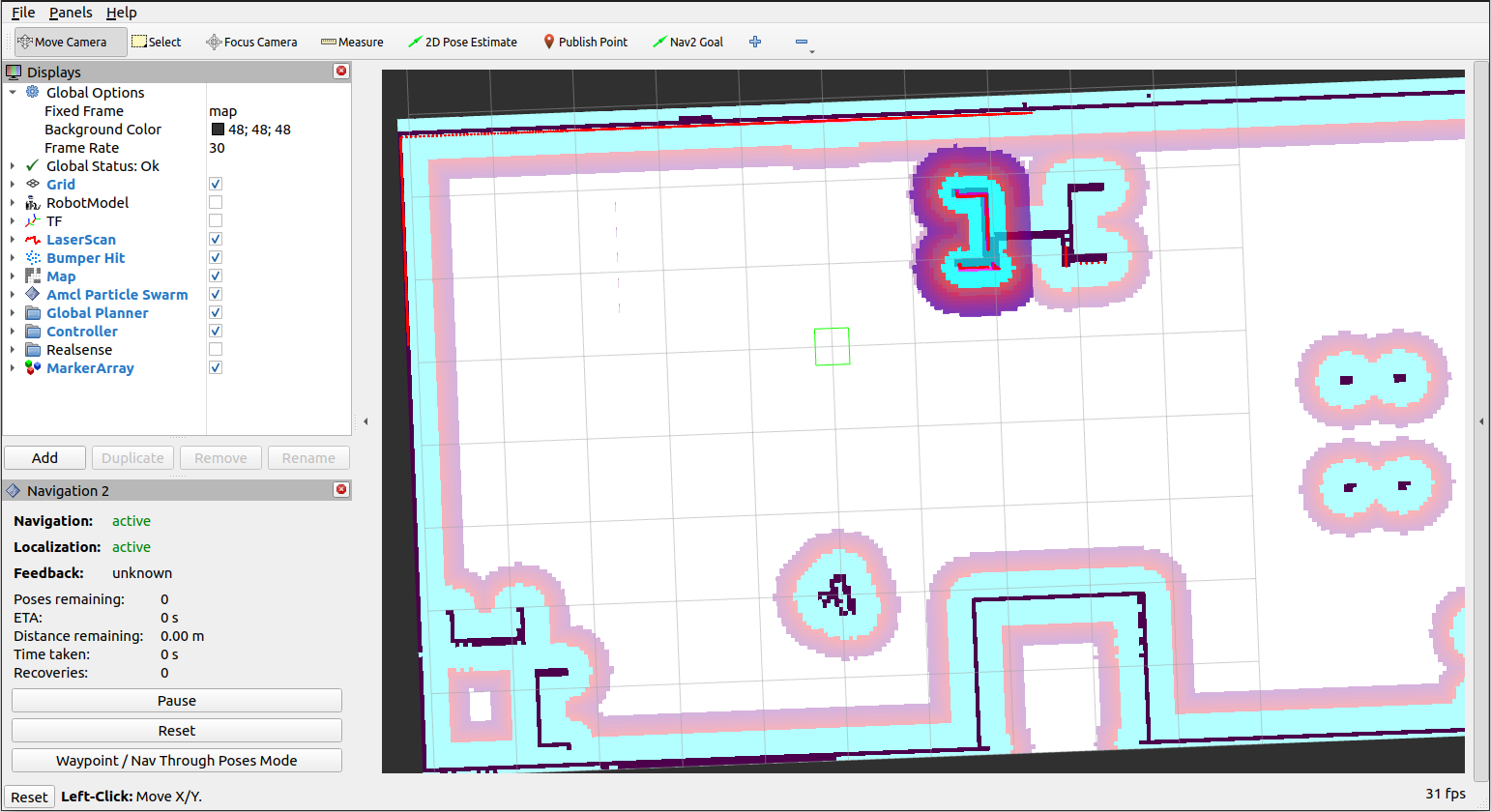
Move the ebot using teleop and it should localize well, if not try to tune the AMCL params