

Task 2A - Instructions
Task
(You are free to create multiple scripts, but remeber you will need that many number of terminals to be shown during video recording)
-
Take the position of aruco box, using TF which you did in task 1A.
-
Using task 1B logic go to that position and pick the boxes (Refer point 4).
-
Now place the boxes from the rack to the drop location, i.e. on the table behind the arm. (You may refer the expected output video to gain more idea about the same.)
-
To attach the box with the gripper, you can use this service
/GripperMagnetON. To detach you can call the service/GripperMagnetOFF.
The gripper should be close as (<0.2 m - distance between link of box and wrist_3_link of ur5) to the box.
The service example call goes like:
# To attach
ros2 service call /GripperMagnetON linkattacher_msgs/srv/AttachLink "{model1_name: 'box1', link1_name: 'link', model2_name: 'ur5', link2_name: 'wrist_3_link'}"

# To detach
ros2 service call /GripperMagnetOFF linkattacher_msgs/srv/DetachLink "{model1_name: 'box1', link1_name: 'link', model2_name: 'ur5', link2_name: 'wrist_3_link'}"
here:
"{
    model1_name: 'box1',        >> Just change this with the box model name you get from aruco TF's
    link1_name: 'link',         >> Don't change this
    model2_name: 'ur5',         >> Don't change this
    link2_name: 'wrist_3_link'  >> Don't change this

    }"
You can create python client using (sample snippet, similarly do for
DetachLink):from linkattacher_msgs.srv import AttachLink gripper_control = self.create_client(AttachLink, '/GripperMagnetON') while not gripper_control.wait_for_service(timeout_sec=1.0): self.get_logger().info('EEF service not available, waiting again...') req = AttachLink.Request() req.model1_name = <Specify the box name> req.link1_name = 'link' req.model2_name = 'ur5' req.link2_name = 'wrist_3_link' gripper_control.call_async(req)
Note:
Make sure you have the three line as shown below on the gazebo terminal (if everything works fine ;p) -
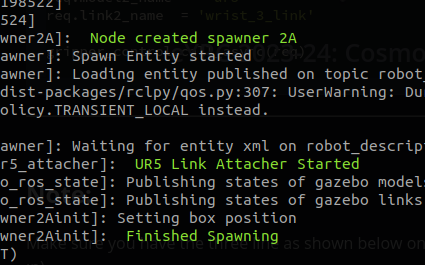
Expected Output
Note: Deadline for the submission of this task is 10th November, 2023