

Components of Nav2
1. Costmaps
-
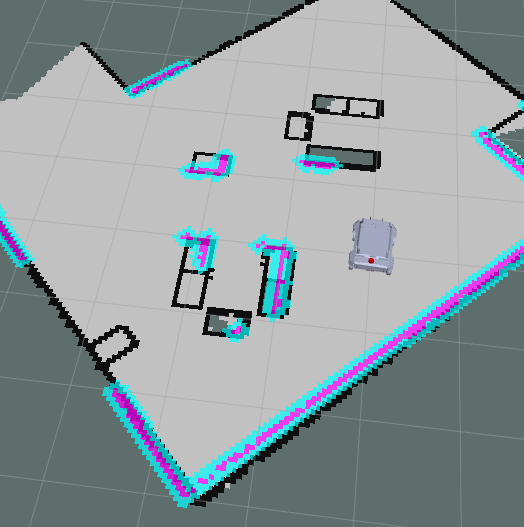
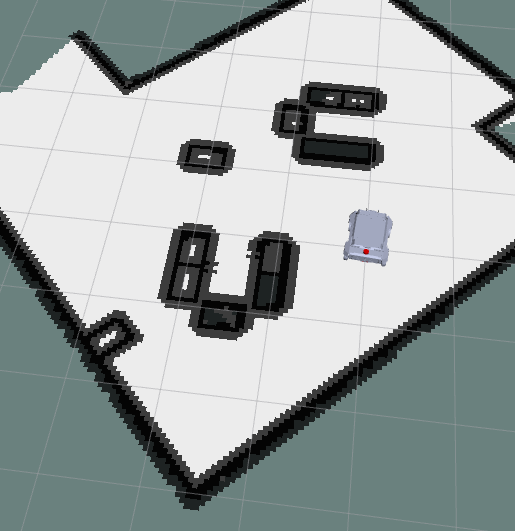
Cost map is a grid in which every cell gets assigned a value (cost) determining distance to obstacle, where higher value means closer distance.
-
Using this map, the robot plans the path in such a way that it avoids obtsacles by creating a trajectory with lowest cost.
-
There are 2 costmaps, one for local planner which determines obtsacles near the robot and the other one for global planner to plan a global path from the start point to the goal with keeping the obstacles in mind.
1.1 Local Costmap
- These are the parameters used by a local cost map in
nav2_parma.yamlin dir/ebot_nav2/params/.
local_costmap:
  local_costmap:
    ros__parameters:
      update_frequency: 5.0
      publish_frequency: 2.0
      global_frame: odom
      robot_base_frame: "base_footprint"
      use_sim_time: True
      rolling_window: true
      width: 3
      height: 3
      resolution: 0.05
      footprint: "[ [0.21, 0.195], [0.21, -0.195], [-0.21, -0.195], [-0.21, 0.195] ]"
      plugins: ["voxel_layer", "inflation_layer"]
      inflation_layer:
        plugin: "nav2_costmap_2d::InflationLayer"
        cost_scaling_factor: 3.0
        inflation_radius: 0.55
      voxel_layer:
        plugin: "nav2_costmap_2d::VoxelLayer"
        enabled: True
        publish_voxel_map: True
        origin_z: 0.0
        z_resolution: 0.05
        z_voxels: 16
        max_obstacle_height: 2.0
        mark_threshold: 0
        observation_sources: scan
        scan:
          topic: /scan
          max_obstacle_height: 2.0
          clearing: True
          marking: True
          data_type: "LaserScan"
          raytrace_max_range: 3.0
          raytrace_min_range: 0.0
          obstacle_max_range: 2.5
          obstacle_min_range: 0.0
      static_layer:
        map_subscribe_transient_local: True
      always_send_full_costmap: True
  local_costmap_client:
    ros__parameters:
      use_sim_time: True
  local_costmap_rclcpp_node:
    ros__parameters:
      use_sim_time: True
1.2 Global Costmap
- These are the parameters used by a global cost map in
nav2_parma.yamlin dir/ebot_nav2/params/.
global_costmap:
  global_costmap:
    ros__parameters:
      update_frequency: 1.0
      publish_frequency: 1.0
      global_frame: map
      robot_base_frame: "base_footprint"
      use_sim_time: True
      robot_radius: 0.3
      resolution: 0.05
      track_unknown_space: true
      plugins: ["static_layer", "obstacle_layer", "inflation_layer"]
      obstacle_layer:
        plugin: "nav2_costmap_2d::ObstacleLayer"
        enabled: True
        observation_sources: scan
        scan:
          topic: /scan
          max_obstacle_height: 2.0
          clearing: True
          marking: True
          data_type: "LaserScan"
          raytrace_max_range: 3.0
          raytrace_min_range: 0.0
          obstacle_max_range: 2.5
          obstacle_min_range: 0.0
      static_layer:
        plugin: "nav2_costmap_2d::StaticLayer"
        map_subscribe_transient_local: True
      inflation_layer:
        plugin: "nav2_costmap_2d::InflationLayer"
        cost_scaling_factor: 3.0
        inflation_radius: 0.55
      always_send_full_costmap: True
  global_costmap_client:
    ros__parameters:
      use_sim_time: True
  global_costmap_rclcpp_node:
    ros__parameters:
      use_sim_time: True
2 Planner
- There are 2 types of planners in the Navigation stack:
- Local Planner - Global planner plans the path from the start to the end goal.
- Global Planner - Local planner is used to avoid obstacles and get the robot back to the global path after avoiding obstacles.
2.1 Local Path Planner
-
The purpose of local planner is to find a suitable local plan at every instance.
-
There are various local planners that are used. We will be using the dwa local planner.
-
Using a map, the planner creates a kinematic trajectory for the robot to get from a start to a goal location.
-
Along the way, the planner creates, at least locally around the robot, a value function, represented as a grid map.
-
This value function encodes the costs of traversing through the grid cells. The controller's job is to use this value function to determine dx,dy,dtheta velocities to send to the robot.
-
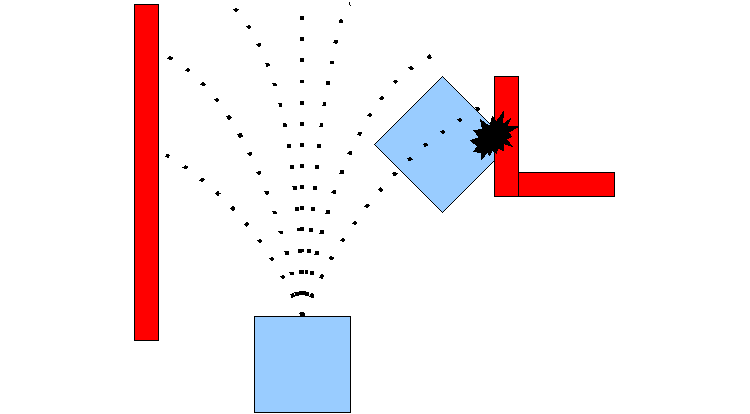
The basic idea of the Dynamic Window Approach (DWA) algorithm is as follows:
- Discretely sample in the robot's control space (dx,dy,dtheta)
- For each sampled velocity, perform forward simulation from the robot's current state to predict what would happen if the sampled velocity were applied for some (short) period of time.
- Evaluate the cost of each trajectory resulting from the forward simulation, using a metric that incorporates characteristics such as: distance to obstacles, distance to the goal, distance to the global path, and speed. Discard the trajectories those that collide with obstacles.
- Pick the minimum cost trajectory and send the associated velocity to the mobile base.
- Rinse and repeat.
2.2 Global Path Planner
-
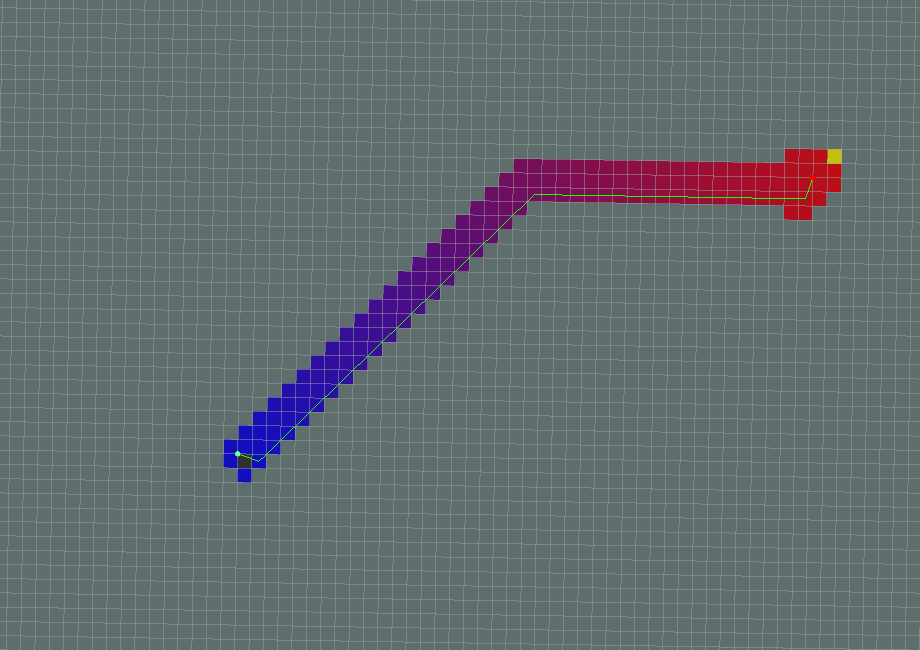
The purpose of global path planner is to plan the shortest path which avoids all the obstacle from the start point to the goal point.
-
There are a lot of various path planers used such as Djiktstras, D star, potential field but the one we are gonna focus on is A*
-
A star is a grid-based algorithm. It uses the global costmap provided to find the fastest path to the goal point without hitting any obstacle
- These are the parameters related to planner in
nav2_parma.yamlin dir/ebot_nav2/params/.
planner_server:
  ros__parameters:
    expected_planner_frequency: 20.0
    use_sim_time: True
    planner_plugins: ["GridBased"]
    GridBased:
      plugin: "nav2_navfn_planner/NavfnPlanner"
      tolerance: 0.5
      use_astar: false
      allow_unknown: true

planner_server_rclcpp_node:
  ros__parameters:
    use_sim_time: True
Controller Server
The Dynamics of the bot are controller using this, so this one is very important
- These are the parameters related to Control Server in
nav2_parma.yamlin dir/ebot_nav2/params/.
controller_server:
  ros__parameters:
    use_sim_time: True
    controller_frequency: 20.0
    min_x_velocity_threshold: 0.001
    min_y_velocity_threshold: 0.5
    min_theta_velocity_threshold: 0.001
    failure_tolerance: 0.3
    odom_topic : "/odometry/filtered"
    progress_checker_plugin: "progress_checker"
    goal_checker_plugins: ["general_goal_checker"] # "precise_goal_checker"
    controller_plugins: ["FollowPath"]

    # Progress checker parameters
    progress_checker:
      plugin: "nav2_controller::SimpleProgressChecker"
      required_movement_radius: 0.5
      movement_time_allowance: 10.0

    general_goal_checker:
      stateful: True
      plugin: "nav2_controller::SimpleGoalChecker"
      xy_goal_tolerance: 0.25
      yaw_goal_tolerance: 0.25
    # DWB parameters
    FollowPath:
      plugin: "dwb_core::DWBLocalPlanner"
      debug_trajectory_details: True
      min_vel_x: 0.0
      min_vel_y: 0.0
      max_vel_x: 0.26
      max_vel_y: 0.0
      max_vel_theta: 1.0
      min_speed_xy: 0.0
      max_speed_xy: 0.26
      min_speed_theta: 0.0

      acc_lim_x: 2.5
      acc_lim_y: 0.0
      acc_lim_theta: 3.2
      decel_lim_x: -2.5
      decel_lim_y: 0.0
      decel_lim_theta: -3.2

      vx_samples: 20
      vy_samples: 5
      vtheta_samples: 20

      sim_time: 1.7
      linear_granularity: 0.05
      angular_granularity: 0.025
      transform_tolerance: 0.2
      xy_goal_tolerance: 0.25
      trans_stopped_velocity: 0.25
      short_circuit_trajectory_evaluation: True
      stateful: True

      critics: ["RotateToGoal", "Oscillation", "BaseObstacle", "GoalAlign", "PathAlign", "PathDist", "GoalDist"]

      BaseObstacle.scale: 0.02

      PathAlign.scale: 32.0
      PathAlign.forward_point_distance: 0.1

      GoalAlign.scale: 24.0
      GoalAlign.forward_point_distance: 0.1

      PathDist.scale: 32.0
      GoalDist.scale: 24.0

      RotateToGoal.scale: 32.0
      RotateToGoal.slowing_factor: 5.0
      RotateToGoal.lookahead_time: -1.0

controller_server_rclcpp_node:
  ros__parameters:
    use_sim_time: True
To tune all this parameters, here is the brief guide