

Task 0 - Submission
Submission instructions for task 0:
To evaluate your task 0 performed on your system, we will be requiring a JSON file that will be generated when you execute our auto evaluation script in parallel to your task running. Follow the instructions to submit this file and get evaluated for your task 0.
NOTE: All your tasks will be checked using a plagiarism software. If any submitted file is found to be plagiarised, e-Yantra reserves the right to disqualify the team.
-
Install
eyantra-autoevalby running the command given belowpip3 install -U eyantra-autoeval -
Execute auto evaluation script
After successful installation of
eyantra-autoevalpackage, execute the following command which will generate a.jsonextention file which we will be requiring for evaluating your task 0.eyantra-autoeval evaluate --year 2023 --theme CL --task 0 -
If you face an error saying
eyantra-autoevalnot found, then you need to add the following line to your~/.bashrcfile and then source it:export PATH=$PATH:~/.local/bin # exporting system path to environment source ~/.bashrc # sourcing bashrc file
IMPORTANT NOTE:
-
First launch the robot in gazebo as instructed before
ros2 launch ebot_description ebot_gazebo_launch.pyand keep it running -
Then open a new terminal and execute the auto eval script
eyantra-autoeval evaluate --year 2023 --theme CL --task 0which will take few seconds to record your data and generate a JSON file (Ex: result-2023-CL-0-20230904.json) in the same directory where you launched this command. -
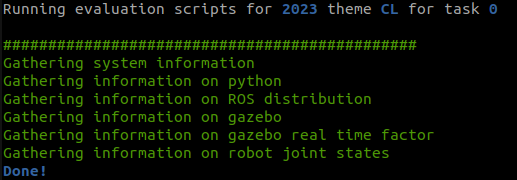
Sample output is shown in the terminal when you run the evaluation script and is succeeded.
-
Once the file is generated, rename it as
<CL#team_id>(For example, if your team id is 1679, rename file asCL#1679.json) and submit on eYRC Portal - Task 0.
This task will be graded in a binary format
SUCCESS-Marks: 1.00
FAILED-Marks: 0.00